
3 Essential Steps for IT Leaders to Implement the Best Power BI Security

The best enterprise-level Power BI security is an integrated system, not a single feature: identity management through Microsoft Entra ID, row-level security (RLS), clear data classification with sensitivity labels, and BYOK encryption where extra control is needed. Start with three things: enable multi-factor authentication for all users, audit RLS on your existing semantic models, and apply sensitivity labels to your critical report sets.
In brief:
- The main Power BI security measure is an integrated system covering identity management, row-level security and sensitivity labels, not individual features.
- It is important to enable multi-factor authentication and audit RLS before rolling out sensitivity labels for critical reports.
- Data encryption happens automatically, and the BYOK option lets you manage keys in line with regulatory requirements, particularly for financial and public sector organisations.
- Configuring RLS and OLS, together with correct role assignment, is essential to restrict data access properly and avoid cosmetic fixes.
- In incident management, it is important to use activity logs and a clear escalation procedure, especially when a data leak or breach is suspected.
Contents
- What makes up the best Power BI security: a feature overview for IT leaders
- How to set up secure sign-in: identity management and conditional access
- Data protection: encryption, export controls and DLP tools
- Implementing RLS and OLS in practice: steps and common mistakes
- Governance and security culture: how to maintain protection over the long term
- Incident management: how to respond to a security breach in a Power BI environment
- The Analitika360 perspective: what we see when deploying secure Power BI environments
- How to get started: security audit, PoC and deployment with Analitika360
- Sources
What makes up the best Power BI security: a feature overview for IT leaders
Power BI’s security architecture rests on several layers, and each addresses a different risk. An IT leader who understands these layers individually makes better decisions than one who sees ‘security’ as a single switch.
Data at rest and in transit is encrypted automatically using Microsoft-managed keys. On Premium capacities, organisations can move to managing their own keys (BYOK) when regulatory requirements demand it, for example in the financial or public sector. This is confirmed by the Power BI security white paper, which describes the full data protection lifecycle within the service.
Another layer that is often confused is row-level security (RLS) and column-level security (OLS). RLS restricts which rows a user sees in a data table, while OLS hides entire columns, such as salary information. Both are configured in Power BI Desktop and assigned to users in the service.
The third factor IT leaders often underestimate is the semantic model’s connection type:
- Import mode copies data into Power BI, so RLS rules work reliably, but the data becomes static until the next refresh.
- DirectQuery sends queries straight to the source database, so security rules must be aligned at both levels.
- Live Connect uses an already published semantic model, so security rules are inherited from the model owner.
- The on-premises data gateway creates an additional access point that needs to be monitored separately.
Sensitivity labels via Microsoft Purview work differently from what many expect. More on this in the next section, but the key point is that a label on its own does not change access permissions in the service.
How to set up secure sign-in: identity management and conditional access
Power BI security depends on Microsoft Entra ID more than most organisations realise. A report may have a perfect RLS configuration, but if any employee can sign in from any device without additional verification, all other protection becomes secondary. The deployment planning guidance clearly identifies conditional access as the primary security control.
Practical steps an IT leader should implement, in order:
- Enable multi-factor authentication (MFA) for all users with access to business data, not just administrators.
- Create risk-based conditional access policies: block sign-ins from unknown countries and require a managed device for remote work.
- Reduce the number of administrators to a minimum and introduce just-in-time (JIT) access for high-level operations.
- Enable activity logs and set up regular reviews of them, not only after an incident occurs.
Pro tip: Don’t make MFA exceptions ‘for convenience’ for senior management or the finance team. These are precisely the accounts with the greatest access to the most sensitive data, which makes them the first target for phishing attacks.
Privileged account management deserves separate attention. Every additional Power BI administrator is an additional point of risk, and most organisations grant such rights ‘to make things easier’ rather than out of genuine need.
Data protection: encryption, export controls and DLP tools
Encryption in the Power BI environment works on two layers: data at rest is encrypted using Azure Storage encryption and TDE technology for Azure SQL databases, while data in transit is protected by standard protocols. The Power BI security white paper confirms that the BYOK option on Premium capacities lets an organisation manage its own encryption keys rather than relying solely on a Microsoft-managed key.
Sensitivity labels have a specific but limited role here:
- A label applies protection when a report is exported to Excel, PowerPoint, PDF or a .pbix file.
- Using labels requires the appropriate licence: Azure Information Protection P1 or P2, together with Power BI Pro or PPU.
- Within the service itself, a label does not change access permissions — it is only displayed and applied on export, as the sensitivity labels overview states.
This nuance forces many IT leaders to rethink their security model: if access control needs to remain within the service, a label alone is not enough, and RLS is required.
An additional, often forgotten layer is Microsoft Defender for Cloud Apps, which acts as a data loss prevention (DLP) tool on top of Power BI. It can monitor and block unusual export activity, such as bulk file downloads from an unusual location.

Implementing RLS and OLS in practice: steps and common mistakes
One of the most frequently overlooked sources of risk: when a user is given access to a report, they automatically gain access to the entire semantic model unless RLS is configured. Hiding visuals in a report is not a security measure but merely a cosmetic fix that anyone who knows how to use Power BI’s export function can get around.
An implementation sequence that actually works:
- Define roles and rules in Power BI Desktop, using DAX functions such as
USERNAME()orUSERPRINCIPALNAME()for dynamic rules. - Choose between static and dynamic rules: static rules suit a small, stable list of users, while dynamic rules linked to Microsoft Entra groups scale better in larger organisations.
- Create group-based mappings so that adding a new employee to a group automatically grants the correct data access.
- Test each role separately using the ‘view as’ function before publishing a report to a wider audience.
- Validate regularly, not only during deployment, because data structures and organisational roles change.
Experience shows that dynamic RLS linked to Microsoft Entra group membership data via a separate dataflow significantly reduces the risk of errors compared with maintaining a user list by hand.
Governance and security culture: how to maintain protection over the long term
Technology without process falls apart within a few months. The Azure security baseline recommends segmentation and regular access reviews as core governance controls, not a one-off project.
Practical governance elements worth embedding in your organisation:
- Carry out an access review at least once a year, and quarterly for critical reports.
- Limit the Power BI administrator role to two or three people, never the whole IT team.
- Prepare documentation and brief training for new users on data classification and export rules.
- Connect activity logs to Microsoft Sentinel so that unusual activity is spotted automatically rather than after the fact.
Pro tip: Appoint one person responsible for the annual access review and write it into their job description. Reviews that ‘belong to everyone’ in practice get done by no one.
Segmentation and zero-trust principles work best when workloads and user roles are clearly separated across networks and access levels, rather than lumped together into one shared administrator group.
Incident management: how to respond to a security breach in a Power BI environment
When you suspect that Power BI data has fallen into the wrong hands, speed matters more than a perfect plan on paper. The first step is to identify the source through the activity logs: who accessed a particular report set or carried out an export, when, and from where.
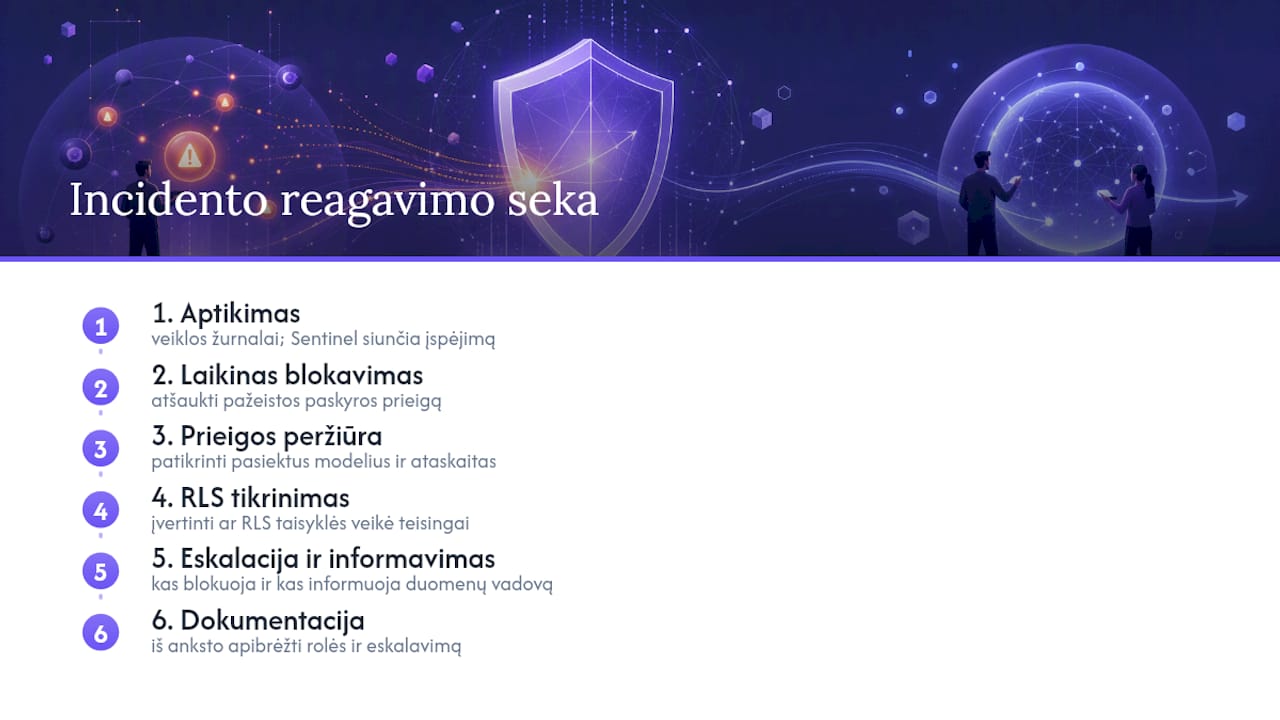
Organisations that connect their activity logs to Microsoft Sentinel have a major advantage during an incident, because anomalies such as a bulk export at an unusual time or a sign-in from an unknown IP address generate an alert automatically, rather than being noticed by chance a week later.
The response sequence should include several specific actions: first, temporarily revoke the compromised account’s access; second, check which semantic models and reports were accessible during that period; third, review whether the RLS rules were applied correctly or whether the attacker had wider access than they should have.
It is important to define in advance who in the organisation decides on blocking an account and who informs the data protection officer if the incident involves personal data. Without a clear playbook, the IT team loses valuable time working out who should do what while the crisis is already unfolding.
A documented incident playbook setting out specific roles and escalation steps shortens response time far more effectively than any additional technical tool without a clear process around it.
The Analitika360 perspective: what we see when deploying secure Power BI environments
Working with Rivilė and Finvalda data, we see a recurring pattern: companies invest in attractive reports but skip identity integration and RLS configuration until it is too late. In the Analitika360 deployment process, security is not an add-on service but the first stage, before any visualisation appears.
Our practice includes three specific steps in every project: Microsoft Entra ID integration from day one, RLS rules tailored to the client’s organisational structure, and data segmentation between departments — for example, in a restaurant chain, where each branch manager should see only their own branch’s figures, not the finances of the entire chain.
Automated reports that refresh without manual intervention reduce the risk of human error, because data is not copied by hand between systems and permissions are managed centrally in one place.
— Analitika360
How to get started: security audit, PoC and deployment with Analitika360
If you are reading this article, you probably already suspect that your Power BI environment has security gaps you cannot see from the user’s side. Analitika360 offers a concrete way to check this without the risk of a large project: we start with a short security audit that shows how your RLS rules currently work, who has administrator rights and how data flows from Rivilė or Finvalda into your reports.
After the audit, you receive a documented security plan with specific steps rather than general recommendations. If needed, we move on to a pilot project (PoC), where we show how identity integration and segmentation work with your real data before any long-term agreement is signed. This lets you assess the results before the solution is fully deployed.
If you would like to see what a finished solution looks like, take a look at our Power BI deployment service or browse the business analytics solutions available for your line of business. Get in touch and let’s agree where to start in your case.
Sources
You can read more about Power BI security architecture in the Power BI security white paper and the Azure security baseline. For a practical deployment approach, see the Analitika360 Power BI deployment page, and for network infrastructure protection, explore computer network security solutions.
- Power BI security white paper