Your business in 360°
 Project Budgets in Power BI: Plan, Actuals and Variances

Project budgets can be tracked in Power BI in a single report. For every project you can see the planned costs, the actual spend from the accounting system, the variance in euros and as a percentage, and the share already invoiced. For these figures to be reliable, you need three things: a project tag on every accounting transaction, a budget table with the same structure, and a data model that refreshes without manual work. This guide explains how to set this up at a company running Rivilė or Finvalda.
In brief
- Key metrics: percentage complete, actual and budgeted costs, variance in euros and as a percentage, share invoiced.
- Each project must be tagged in the accounting system with an object or a cost centre; otherwise Power BI has nothing to link plan and actuals by.
- Budget and actuals are split into the same cost groups: labour time, materials, subcontracting and other expenses.
- Variances are worth reviewing at every key milestone, not just when the project is closed.
- Access is restricted by project, so each manager sees only their own data.
Contents
- Which metrics a project budget report should show
- Where the project data comes from
- The data model: why joining two tables is not enough
- How to roll out a project budget report: 6 steps
- Variance analysis: from figure to decision
- Cash flow, currency and EU-funded projects
- Access rights and traceability of figures
- Our view
- How to track project budgets with Analitika360
- FAQ
- Sources
Which metrics a project budget report should show
A good project budget report answers one question: for what we have spent so far, have we delivered as much as we planned? In its project performance to budget report, Microsoft uses almost the same set of metrics, and it works just as well for companies in Lithuania:
| Metric | What it shows | How it is calculated |
|---|---|---|
| Percentage complete | How much of the work is done | Work completed / planned work |
| Actual costs | How much has been spent to date | Sum of accounting transactions for the project |
| Budgeted costs | How much was planned to be spent | Amount from the budget table |
| Variance, € | How much over or under budget | Actuals − budget |
| Variance, % | Scale of the variance | Variance / budget |
| Invoiced, % | How much revenue has already been recognised | Invoices issued / contract value |
For service businesses it is worth adding hours to these metrics. In Microsoft’s Practice Manager Power BI content, the hours reports compare actual billable, non-billable and budgeted hours. It is usually the non-billable hours that explain why a project is profitable on paper but not in the bank.
Example: when a variance becomes a warning sign
Suppose a construction project has a budget of €120,000. So far €78,000 has been spent and 55% of the work is complete. At first glance all is well, since the budget has not yet been used up. However, based on the percentage complete, €66,000 should have been spent, so actual costs are €12,000 higher than they ought to be. The cost performance index is 66,000 / 78,000 ≈ 0.85. If the pace does not change, the final cost of the project will reach around €141,800, nearly €22,000 over plan. A figure like this shows up in the report now, while there is still time to change subcontractor, review materials purchasing or agree additional works with the client.

Where the project data comes from
A project budget report combines at least three sources. Whether managers trust the figures depends on the quality of each of them.
- The accounting system. Actual costs and revenue come from Rivilė or Finvalda. In Rivilė, projects are usually tagged with objects and cost centres, alongside a further dimension, the department. In Finvalda, depending on the version, transactions can also be tagged with objects. If some invoices are posted without an object, those costs will end up in an “Unassigned” group in the report, and this needs to be visible straight away.
- The budget file. At most companies the budget is kept in an Excel file or a SharePoint list. It is important that it uses the same project code and the same cost groups as the accounting system. How to read such files automatically is described in our guide to SharePoint document reports.
- Timesheets and other systems. Hours, CRM deals or logistics data complete the picture. For Finvalda users, the Finvalda API connection to Power BI is also relevant, as it lets you pull data without manual exports.
The data model: why joining two tables is not enough
A common mistake is to join the budget file to the accounting export with a single VLOOKUP or a single Power BI relationship. You then see the overall variance, but not where it comes from. Reliable project management needs an analytical model in which the different transaction types (labour time, materials costs, subcontractor services) are classified according to a shared dimension structure.
In practice the model consists of:
- Fact tables: accounting transactions, budget lines, hours, invoices issued.
- Dimensions: project (code, manager, client, status), cost group, calendar, department.
- Mapping table: which general ledger accounts belong to which cost group.
This structure lets you tell whether the budget was exceeded because time was used inefficiently or because of unforeseen materials costs. It is worth planning the budget by month, as you can then compare not only the total but also the pace. You will find more on the structure in the article on the data model for finance, and on plan versus actual calculations in the guide to budget comparison in Power BI.
How to roll out a project budget report: 6 steps
- Agree on the project code. One code in the accounting system, the budget and the timesheet system. Without this, no visualisation will help.
- Map accounts to cost groups. Draw up a mapping table and approve it with the chief accountant.
- Prepare a budget template. Rows: project, month, cost group, amount. No merged cells or subtotals.
- Build the model and measures. Variance in euros and as a percentage, percentage complete, forecast final cost.
- Switch on automatic refresh. Data from Rivilė or Finvalda should refresh on a schedule, without manual exports. Before that, check data quality against the checklist for analysts.
- Set a review rhythm. Microsoft’s plan versus actual analysis pattern recommends reviewing a project not only at the end but also at key interim milestones. The review points are most conveniently tied to the project stages already set out in the action plan implementation schedule.
Variance analysis: from figure to decision
Projects usually go over budget not because a variance arises, but because it is spotted too late. That is why the report should not only show the past but also help you decide while the variance is still manageable. The process Microsoft describes has four parts in a cycle: recording actual transactions, regular monitoring, variance analysis (unexpected costs, changes in scope) and corrective action, such as adjusting the plan or reallocating resources.
To assess a project’s financial health, the same Practice Manager content combines four areas: project overview, cost, revenue and earned value management (EVM). EVM metrics, namely the cost and schedule performance indices, show whether a project is running late and whether it is getting more expensive, even when the total still fits within the budget.
A practical report layout:
- Page one: a list of all projects with their variance and colour coding.
- Page two: the plan versus actual curve for a single project by month.
- Page three: variance by cost group and supplier, with the option to drill down to an individual invoice.
If project profitability matters more to you than cost control alone, you will find further ideas in the article on assessing project profitability, while construction companies may find construction cost control practice useful.
Cash flow, currency and EU-funded projects
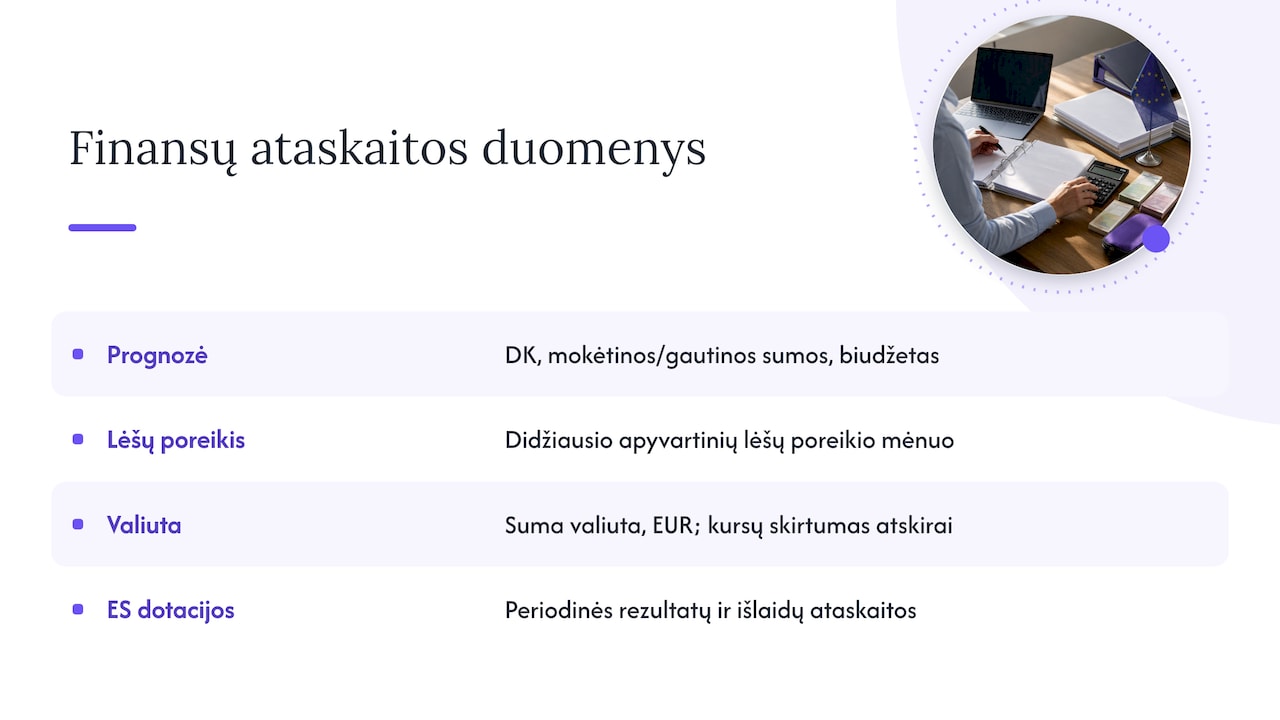
The budget shows how much a project will cost, but not when the money will be needed. Microsoft’s documentation on cash flow forecasting describes how the forecast integrates with the general ledger, payables, receivables and the budget. The same logic can be carried over to Power BI: the project payment schedule combined with unpaid invoices shows in which month the project will tie up the most working capital. How to introduce this kind of analysis in a finance team is described in the guide to cash flow analysis in Power BI.
When some suppliers invoice in dollars or another currency, the euro budget can change even if quantities do not. In that case it is worth holding both the original amount and the euro amount in the model, and showing exchange differences on a separate line. When planning such expenses, it also helps to understand currency exchange pricing, as it directly affects actual costs.
For projects funded by EU grants, the financial report is only part of the reporting. In describing project management under a grant agreement, the European Commission emphasises periodic reports on results and expenditure. Here Power BI becomes the bridge between the accounting data and the project’s technical progress.
Access rights and traceability of figures
Project budgets contain sensitive information: pay, rates and supplier prices. That is why access is worth restricting not only at report level but also at row level, so that a project manager sees only their own projects while the finance director sees them all. The second requirement is traceability: every figure in the report must be verifiable back to the source document, such as a specific purchase invoice. We wrote more about data protection in the article does Power BI comply with GDPR.
Our view
When rolling out reports for Rivilė and Finvalda users, we see that the problem with project budgets rarely lies in Power BI itself. Most often it starts in the accounts: some invoices without an object, a budget in an Excel file with different names, hours in a separate system. So we first sort out the dimension structure and the cost group mappings, and only then build the visualisations.
The second lesson: a report that has to be updated by hand stops being used after a few months. That is why, for us, automatic refresh is not an extra feature but a prerequisite. When the figures update themselves, the project manager spends review time on decisions rather than on gathering data.
— Analitika360
How to track project budgets with Analitika360
Analitika360 builds Power BI reports that pull data from Rivilė and Finvalda automatically and combine it with Excel, SharePoint or other sources in a single model. The foundation is our ready-built packages:
- Rivilė Basic and Finvalda Basic: €59 a month;
- Rivilė PRO and Finvalda PRO: €89 a month;
- Custom projects: €70 an hour, when you need reports built around your project structure.
A project budget report with your cost groups and budget template is built as a custom solution. Compare plans and terms on the business analytics pricing page or start with the Rivilė Basic or Finvalda Basic package.
FAQ
Can Power BI pull project data directly from Rivilė or Finvalda?
Yes, provided projects are tagged with objects or cost centres in the accounting system. Actual costs can then be retrieved automatically by project and compared with the budget. Without a project tag, costs cannot be allocated reliably.
Where is the best place to keep the project budget?
Usually in an Excel file or a SharePoint list with a clear template: project, month, cost group, amount. Most importantly, the codes must match the accounting system and the file must sit in one permanent location from which Power BI reads it automatically.
How often should project variances be reviewed?
At least once a month, and additionally at every key project milestone. On long projects, such as construction, it is worth reviewing every two weeks, because a variance spotted late is already hard to bring under control.
Do all project managers need Power BI licences?
Sharing reports across an organisation usually requires paid Microsoft licences, and the type depends on the number of users and your needs. Analitika360 resells Microsoft Pro and Premium licences and helps you choose the right option.
Sources
- Project Performance to Budget (Power BI Report), Microsoft Learn
- Practice Manager Power BI content, Microsoft Learn
- Pattern for analyze project actuals vs budget, Microsoft Learn
- Cash flow forecasting, Microsoft Learn
- Objects, Rivilė guide
- Managing your project under a grant agreement, European Commission
- Action plan and implementation, Market Smart
- How to understand currency exchange pricing, Forexlita